
Watch every interface, live
View connection health and throughput, trace messages, and replay failed deliveries. The browser console connects to the engine through its local API.
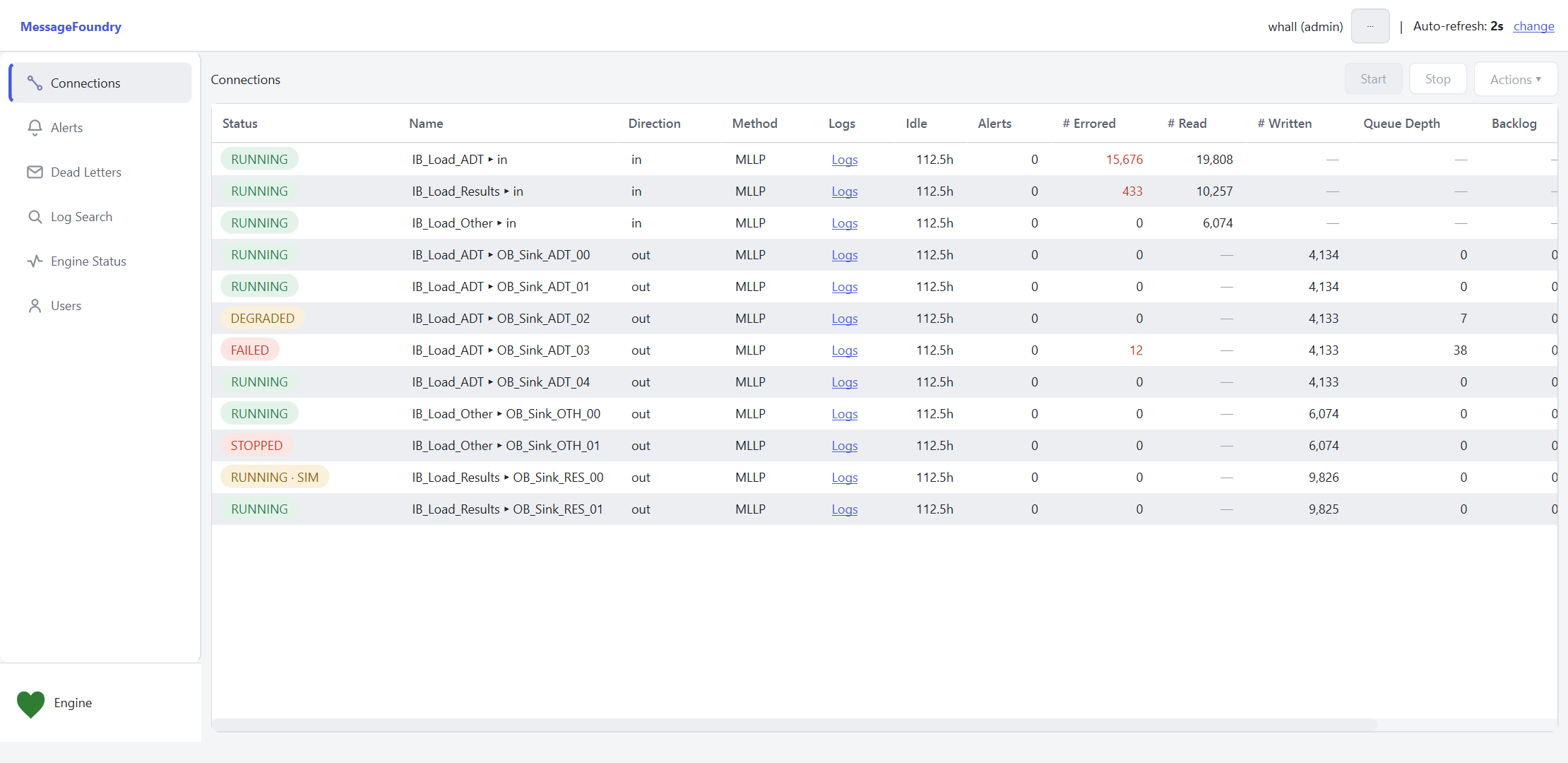
Every interface, at a glance
The dashboard shows inbound and outbound connections in a table that refreshes automatically. Check status, throughput, and queued messages.
Open connection logs or start and stop a connection. Your role controls which actions you can use.
- Status at a glance — RUNNING, DEGRADED, FAILED, or STOPPED — and a
SIMtag when a destination is running in simulation. - Throughput, per connection — messages read, written, and errored, so a climbing error count is obvious immediately.
- Queue depth & backlog — see exactly where messages are piling up, and how far behind a slow peer has fallen.
- Per-connection logs — jump straight from a row to that interface's log stream.
- Start / Stop / Actions — operate interfaces in place, permission-gated.
- Auto-refresh — the view updates every couple of seconds; no reloading.
Investigate failed messages
Open a connection with errors to inspect the affected messages.
Alerts
View active alert rules and the conditions they monitor.
Dead Letters
Inspect messages that exhausted their retries. Fix the cause, then replay stored messages from the list.
Trace a message
Find a message and inspect its outcome: routed, filtered, or unrouted. Review its delivery and audit records, read HL7 fields, or replay it.
Engine health and access, built in
- Engine Status — the engine's health at a glance, with a heartbeat indicator that's green when all is well.
- Users & sessions — manage accounts, roles, and active sessions from the console; every action is recorded in the tamper-evident audit log.
A pure API client
The console uses the local API for all engine access. Authentication, roles, and audit checks run there. The console does not access the database directly.
Monitoring is read-only; actions like start/stop and replay are permission-gated. The same API powers the CLI and the VS Code editor — see how it fits together.
Connect the console to your engine
Open the console to inspect connection status and message outcomes.